
Most people get backlink exchanges wrong — not because the idea is bad, but because they rush into it without checking who’s on the other side.
Here’s the typical sequence. Two site owners agree to swap links. Both walk away thinking they scored a win. Then three months later, one of them takes a hit in rankings — because they linked to a site Google had already flagged. And the other one? Bad sites drag down everyone linked to them.
It’s a frustrating situation, especially when you did everything with good intentions. But it’s also entirely avoidable.
This guide covers the right way to do it — how to vet sites properly before agreeing to anything, what Google penalizes (it’s not what most people assume), and how to Exchange Backlinks that hold up over the long term without leaving a mess to clean up later.
First, Let’s Clear Up What Google Actually Says
You’ve probably heard this at some point: “Google hates link exchanges.” That’s not accurate. Here’s what Google’s own Spam Policy page actually says (last updated May 2026):
“Excessive link exchanges (‘Link to me and I’ll link to you’) or partner pages exclusively for the sake of cross-linking” — these are the violations.
Two words in that sentence matter more than anything else: excessive and exclusively.
Google isn’t going after every site that has a reciprocal link in its profile. It’s going after coordinated link networks where the only reason a link exists is to move a ranking number — no editorial judgment, no relevance, no real value to anyone reading the page.
A well-placed link between two real publishers in the same niche? That’s just the web working the way it’s supposed to.
And the data backs this up. Research by Ahrefs found that 43.7% of top-ranking pages contain some form of reciprocal links. These aren’t penalized sites — they’re normal websites that reference each other because their content genuinely overlaps.
The problem was never the exchange itself. The problem is doing it carelessly, at scale, with sites you never bothered to check.
What Google’s System Is Actually Looking For
Google’s spam detection runs on a system called SpamBrain. It is much smarter now than before. It doesn’t look at individual links the way most people think. It looks at patterns.
The relationships between sites, when links were acquired, how anchor text is distributed across a profile, and whether the cluster of mutual links looks like something that happened organically or something that was clearly arranged.
Two patterns consistently raise flags:
1) Doing too many exchanges too fast.
Natural link profiles grow slowly. A sudden cluster of reciprocal links that appears within a short time window (especially across sites that all look similar) reads as coordinated activity. SpamBrain is specifically trained to catch this.
2) Letting your reciprocal ratio climb too high.
Analysis across 140,000+ domains shows a consistent pattern. When 0–20% of your referring domains are also sites you link back to, you’re in safe territory. Cross 40%, and you’re in high-risk territory — that level of mutual linking strongly suggests a scheme rather than natural editorial overlap.
For most sites, the practical target is keeping reciprocal links under 20% of your total referring domains. Below that, with diverse anchor text and steady growth, the data show no elevated algorithmic risk.
How to Vet a Site Before You Say Yes to Exchange Backlinks
This is the step that separates exchanges that work from ones that blow up in your face later. Most of the guides give you a one-liner here, “make sure they have a good DR”, and move on. That’s not enough. DR is a third-party metric. It can be inflated with cheap spammy links, and Google doesn’t even use it. What you need to look at is more specific. Here’s the checklist:
- Does the site have real organic traffic?
Pull up Ahrefs or SEMrush and check their traffic graph. A DR 45 site with 150 monthly organic visitors is a dead domain with inflated metrics. A practical floor to work with: at least 1,000 organic visitors per month.
- What does their outbound link neighborhood look like?
Open their recent articles. If you see “best crypto wallets” sitting next to “personal injury lawyers” sitting next to “keto supplements” in the same post, that site is selling links. You don’t want your name next to any of that. Google reads link neighborhoods, and being associated with a bad one costs you.
- Is the niche match real?
Two sites in the “marketing” space aren’t automatically a match. If their content is about influencer campaigns and yours is about technical SEO, check whether the specific page where your link would live makes sense in context. Google processes the text surrounding a link to understand what it’s pointing to. A link that fits naturally inside a relevant paragraph carries more weight and looks more legitimate than one shoehorned into a post it has no business being in.
- What does their traffic history tell you?
Look at the traffic chart going back at least a year, ideally two. A sharp drop that lines up with a known Google spam update and hasn’t recovered is a warning sign. That site has been under scrutiny. You can still make a judgement call, but go in with eyes open.
- Is their DR in a similar range to yours?
Exchanges feel natural when the value is roughly equal. A DR 10 site reaching out to a DR 60 site for a swap doesn’t offer the DR 60 site anything meaningful. It also signals something about the intent. Target sites within about 15–20 DR points of your own.
The Anchor Text Problem That Gets Sites Flagged
Even if you find the perfect partner site, bad anchor text can ruin the whole deal. It’s the quiet mistake that usually triggers a penalty months later.
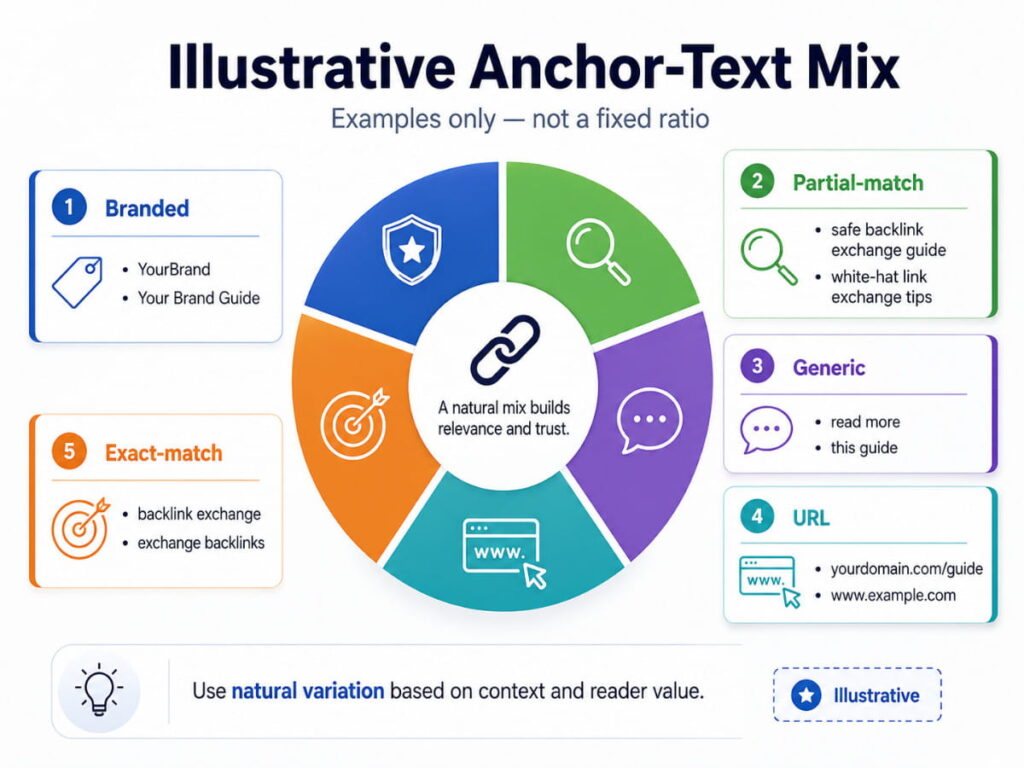
The main issue is exact-match anchors. When you repeatedly use the precise keyword you want to rank for across multiple exchanges, you hand SpamBrain a clear signal that you are gaming the system. A genuine link profile never has the exact same buying keyword sitting in 40% of its anchor text. Real people just don’t link like that. A distribution that holds up over time looks more like this:
| Anchor Type | Description & Usage |
| Branded | Your site name or URL should make up the largest chunk of your profile. |
| Partial match | A phrase that includes but doesn’t exactly replicate your target keyword. |
| Generic | Common phrases like “this guide,” “read more,” or “via this post.” |
| Exact match | Use the exact target keyword; use sparingly (10–15% of your total profile at most). |
If someone emails you asking for a specific exact-match keyword as a non-negotiable condition of the swap, that’s a signal they’re optimizing for an algorithm, not for readers. Genuine white-hat exchanges don’t come with anchor-text demands attached.
How to Reach Out (Without Sounding Like a Bot)
Finding a good site is only half of the job. You still must convince a real person on the other end to say yes.
Most outreach emails fail immediately because they’re either too vague, too salesy, or clearly templated. Site owners can smell a copy-paste pitch from the subject line. What actually gets replies is being direct, specific, and honest about what you want.
Here’s a template that works. The reason it works is that it doesn’t pretend to be something it’s not:
Subject: Quick link collaboration — [Their Site] + [Your Site]
Hi [Name],
I run [Your Site Name] — we cover [brief description of your niche, one line].
I came across your article on [specific topic] and thought it paired well with something I recently published: [your article title/topic]. I think a mention from your piece would genuinely add context for your readers, and I’d be happy to return the favor on a relevant page on my end.
Not looking for a direct swap if that’s a concern — happy to discuss how the placement makes sense for both sides first.
Would you be open to a quick exchange on this?
[Your Name] [Your Site URL]
A few things that make this work: you reference a specific article (which shows you actually looked at their site), you explain the relevance up front (so readers benefit), and you address the main hesitation most site owners have (the direct swap concern) before they even raise it. Keep follow-ups short.
One follow-up after 5–7 days is fine. Beyond that, move on.
What to Do When Someone Reaches Out to You
Inbound requests are trickier than they look. The volume of low-quality outreach in most inboxes is high, and saying yes to the wrong one costs you.
Here are some quick filters to run before replying:
- Check the site before you respond. Run the vetting checklist above. If the email looks automated or the domain fails the traffic check, don’t engage.
- Ask for specifics before agreeing to anything. “We’ll put your link on our site” is not enough information. You need the exact page, the paragraph context, and the planned anchor text. If they can’t answer those three things clearly, the link will likely end up buried in a footer or dropped into a post where it makes no sense.
- Say no when it doesn’t fit. Most inbound exchange requests won’t meet the criteria. That’s normal. Rejecting them isn’t being difficult — it’s protecting a profile you’ve been building. One bad exchange from a site that later gets flagged can leave you with cleanup work that takes months to sort out.
Sites to Walk Away From — No Exceptions
Some signals should end the conversation immediately, regardless of how impressive the DR looks:
- Sites that visibly advertise link sales or sponsored posts on every page — these are link farms with a content skin
- Outbound profiles packed with unrelated niches — the neighborhood test fails right there
- Sites where almost every article is thin content that exists only to host external links
- Any platform that automates exchange matching at scale is structurally similar to the link networks that Google targeted in its August 2025 spam updates.
- Sites with sharp traffic drops in the last 12 months that haven’t recovered
A high DR from a toxic neighborhood is more dangerous than a modest DR from a clean, relevant site. The number alone doesn’t protect you from what the site is connected to.
Track Every Exchange — This Is What Most People Skip
Once a link goes live, many site owners consider the exchange done and move on.
That’s a big mistake.
Site owners update content, change themes, restructure pages, or quietly remove links they agreed to keep. Sometimes, a do-follow link gets changed to no-follow without any notice. If you’re not tracking your exchanges, you won’t know until you run an audit months later and realize you’ve been giving out links that were never returned.
Set up a simple tracking sheet (On Google Sheets) to work perfectly:
| Partner Site | Contact | Date Agreed | Your Link URL | Their Link URL | Anchor Text | Status |
| example.com | name@site.com | June 2026 | yourdomain.com/article | example.com/post | Your Brand | ✅ Live |
Remember to check this once a month. You can do it manually or use Ahrefs link monitoring to get alerts when a backlink changes status.
If a partner removes your link, reach out once, politely. If it doesn’t get resolved, remove the link you gave them. Treat it like a business arrangement — because that’s exactly what it is.
Where to Find Sites Worth Working With to Exchange Backlinks
The hardest part of doing exchanges right is finding sites that actually pass the checklist. Cold outreach is slow, and most of the responses that come back are from sites you’d reject anyway.
The faster route is finding site owners who have already opted into a vetted community and are actively looking to collaborate. Inside the WebSEO Club Discord, members have real sites and have specifically joined a network built around clean, niche-relevant link partnerships. You’re not emailing strangers and hoping they understand what a safe exchange looks like — you’re connecting directly with people who already do.
The public backlink exchange list is also filterable by niche and DR, so you can identify sites in the right range without spending hours prospecting from scratch.
The Full Process to Exchange Backlinks, Start to Finish
Put all this together, and the workflow looks like this:
- Find candidates — Work within your niche. Target sites within 15–20 DR points of yours, with real organic traffic and content that genuinely overlaps with yours.
- Vet before you reach out — Traffic history, outbound link neighborhood, content-level relevance, DR proximity. Any red flag, move to the next one.
- Reach out with something specific — Reference a real article on their site. Explain why the link would help their readers. Make the relevance obvious before they have to ask.
- Agree on placement before anyone writes anything — Confirm the exact page and the paragraph context where each link will go. Vague agreements turn into footer links and irrelevant placements.
- Let anchor text happen naturally — Don’t specify exact-match keywords. Branded and partial-match anchors look right. Identical commercial phrases across every exchange link do not.
- Track it and keep the ratio in check — Log every exchange. Check monthly. If your reciprocal ratio starts climbing past 20%, slow down and add some earned or content-driven links to balance the profile.
The Bottom Line
Backlink exchanges aren’t naturally risky. They become risky when people rush them, skip vetting, push the anchor text too hard, or link to sites that are already on thin ice with Google.
Done properly, an exchange is just two real publishers in the same space acknowledging each other’s work. That’s what the web is supposed to look like — and it’s exactly the kind of link profile Google’s systems are built to reward, not punish.
Ten well-vetted exchanges with relevant, real-traffic sites will do more for your domain than fifty rushed ones with sites you never checked. And they won’t leave you spend three months cleaning up a problem you didn’t have to create. So, Vet first. Track everything. Exchange second. That order makes all the difference.